
ClickMagick Review 2026: Pricing, Features and Is It Worth It for Affiliates?
By Oscar · 26 min read
Disclosure: some links in this review are affiliate links, including our ClickMagick link. If you sign up through them, AffiliateCrownd may earn a commission at no extra cost to you. It never changes our verdict. Read our affiliate disclosure. Prices, trial and refund terms last checked on ClickMagick’s website: November 27, 2026.
This ClickMagick review is for anyone who spends money or time sending traffic to an offer and still can’t answer a simple question: which ad, post or email actually made the sale? Maybe you run TikTok ads to an affiliate offer, or share links on YouTube and in your newsletter. Either way, the dashboards rarely agree, and it is hard to know what to scale and what to switch off.
ClickMagick is a click tracking and attribution tool built for that problem. It follows each visitor from the first click to the sale, then sends that sale data back to your ad platforms. Plans start at $79 a month. Its biggest limitation for affiliates: it can only credit a commission to the right click if your affiliate network can send the sale back to it, so check that first. Below you’ll find what it does in plain English, the full 2026 pricing, how the free trial and refunds work, how it tracks affiliate sales, real alternatives with checked prices, and who should skip it.
What we checked, and what we did not test
Checked on November 27, 2026: ClickMagick’s pricing page, signup page, Trial Policy, Refund Policy, referral program page and its Knowledge Base articles on affiliate tracking, plus the public pricing pages of RedTrack, Voluum and AnyTrack and ClickMagick’s Trustpilot profile. Every price and rule below comes from those pages, with links in the sources list at the end.
Not tested yet: Oscar has not run campaigns through ClickMagick’s dashboard for this review, so you won’t find claims about tracking accuracy, setup time or support speed from our own use. The images are AffiliateCrownd illustrations, not ClickMagick screenshots. Where a statement is ClickMagick’s own claim, we say so. A hands-on test is planned, and we’ll add real screenshots when it is done.
Quick verdict
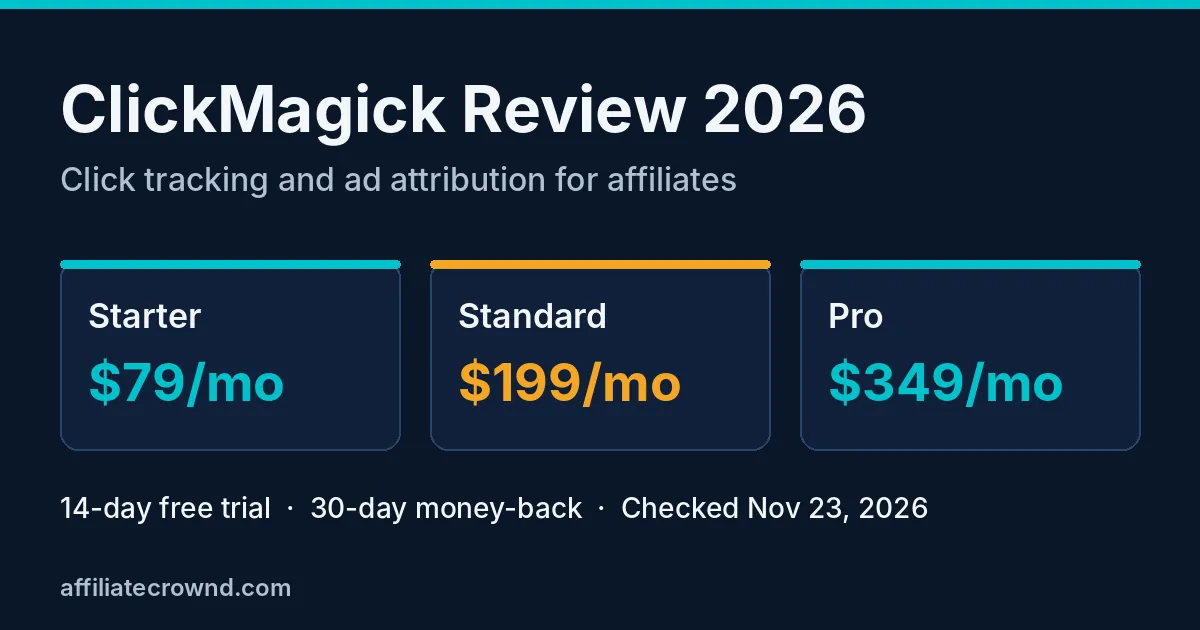
ClickMagick is worth a serious look if you already pay for traffic or promote offers across several channels and need to know exactly which clicks earn money. Starter costs $79 a month for 10,000 tracked visitors, with a 14-day free trial (the signup form asks only for your name, email and a password) and a 30-day money-back guarantee for new customers.
Pick Standard ($199 a month) if you need bot and click-fraud protection, advanced attribution or phone sales tracking.
Skip it for now if you are brand new, have little traffic and no ad budget. Google Analytics 4 and your ad platforms’ free reports will do until you have traffic worth measuring.
Already know ClickMagick and ready to buy? Jump to the buying guide ↓
In this review
ClickMagick Review at a Glance
| Question | Short answer |
|---|---|
| What is it? | An ad tracking and conversion attribution platform (ClickMagick TrueTracking®) that shows which clicks lead to sales |
| Price | Starter $79/month, Standard $199/month, Pro $349/month; yearly billing includes 2 months free |
| Free trial | 14 days; the signup form asks for no payment details |
| Refunds | 30-day money-back guarantee for new customers, first account only |
| Tracks affiliate sales? | Yes, through Postback URLs or Sub-IDs, if your affiliate network supports one of them |
| Best for | Paid-ads affiliates, creators and agencies tracking many traffic sources |
| Skip if | You are just starting out with little traffic and no ad budget |
| Affiliate program | 35% recurring commission, paid daily via PayPal ($50 minimum) |
What Is ClickMagick? Click Tracking and Attribution Explained Simply
ClickMagick started in 2014 as a link tracker. Today its system is called ClickMagick TrueTracking®, and it tracks clicks and conversions from Facebook and Meta ads, Google, TikTok, YouTube and native ads, plus your social posts, emails and on-page actions such as button clicks and video plays.
Here are the key terms in plain English.
- Click tracking means recording every click on a link and where it came from.
- A conversion is the action you care about: a sale, an email sign-up, an add-to-cart or a booked call.
- Attribution means giving credit for that conversion to the right source. If someone saw your TikTok ad, later clicked an email and then bought, attribution decides how much credit each step gets.
- UTM parameters are small tags added to the end of a link (like
?utm_source=youtube) that tell your tracking tool where the click came from. - First-party tracking means the tracking runs from your own domain instead of a third-party one. ClickMagick says this makes its tracking harder to block.
Why does this matter? Each ad platform reports results from its own point of view, so two platforms can both claim the same sale. You can end up funding ads that look good but don’t make money. ClickMagick puts your traffic in one place and links each conversion back to the click that started it.
It works with tools many creators already use. The company names Shopify, WooCommerce, ClickFunnels®, GoHighLevel, Kajabi and WordPress as examples, and it connects with Zapier for everything else. If you are still choosing a sales platform, our Systeme.io vs ClickFunnels® comparison walks through that decision, and our Systeme.io review covers that platform in depth.
How ClickMagick Tracks Affiliate Sales (and What Your Network Must Support)
This is the part most ClickMagick reviews skip, and it matters most for affiliates. When you promote someone else’s product, the sale happens on their website, not yours. Your tracker never sees the checkout page. So ClickMagick needs your affiliate network to tell it about each sale.
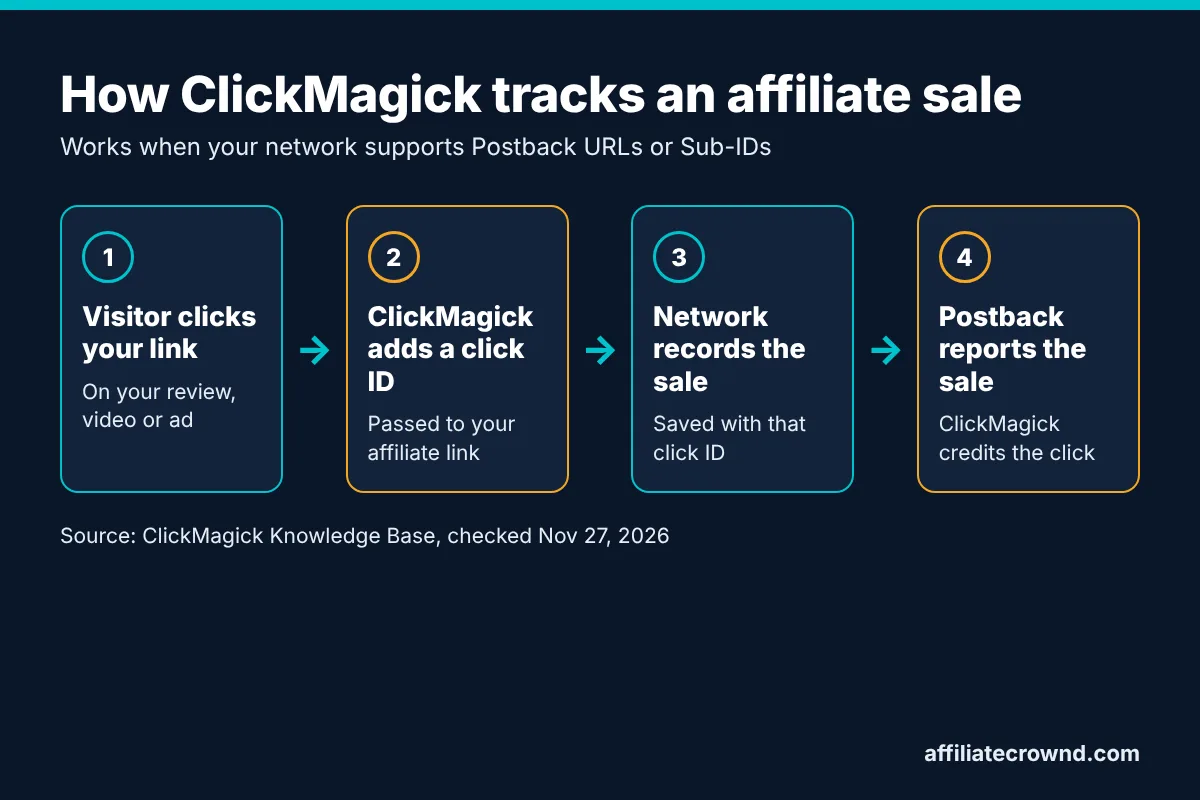
ClickMagick’s Knowledge Base covers two ways to do that:
- Postback URLs (best). You add a ClickMagick click ID to your affiliate link. When a sale happens, the network sends an automatic message (a “postback”) to your ClickMagick Postback URL, so ClickMagick can record the sale and link it to the click. ClickMagick calls this the industry standard.
- Sub-IDs. If a network has no postbacks, you pass a unique Sub-ID with each click and match sales from the network’s own report. ClickMagick names Amazon and LinkShare as examples where you are limited to Sub-IDs.
What you need before you buy
- A network that supports postbacks or Sub-IDs. ClickMagick’s guide walks through MaxBounty (one global postback), BuyGoods and ClickBank (which has its own setup article). CJ Affiliate must approve you manually before you can use postbacks.
- The ClickMagick tracking code on any page that holds your affiliate links, such as your review or bridge page. Without it, the visitor ID token in your link isn’t filled in, so ClickMagick can’t match the sale to the click.
- Your own Postback URL, generated inside ClickMagick under Tools > Affiliate Tools. ClickMagick warns that URLs differ by network, so copy yours from your account rather than from an example.
- A test plan. After setup, compare your network’s sales report with ClickMagick’s. If a postback isn’t recorded, ClickMagick’s Postback Log explains why.
Quick check before your trial: search your network’s help center for “postback URL” or “sub ID”. If it supports neither, ClickMagick can still count your clicks, but it can’t tell you which ones earned a commission.
Where a link plugin like Pretty Links fits
A link plugin turns long affiliate links into short ones on your own domain and counts the clicks. It does not receive sales data from networks, so it can’t tell you which click earned money. Many affiliates use both: the short link for readers, with the ClickMagick tracking link or click ID behind it. If you chain them, test the final link once so the click ID survives every redirect. Our affiliate link disclosure guide covers how to label these links properly.
Who ClickMagick Is For, and Who Should Wait
This is a paid tool for people who need precise numbers. It makes sense when guessing costs you more than the subscription.
ClickMagick is a good fit if you
- Run paid ads on Meta, Google, TikTok, YouTube or native networks and want to know which ads, ad sets and keywords really lead to sales.
- Promote affiliate offers with traffic you pay for, where every wasted dollar comes straight out of your commission.
- Are a creator or agency tracking many sources at once, such as videos, newsletters, social posts and partner links.
- Want one place for your numbers instead of five dashboards that never match.
You should probably wait if you
- Are brand new and getting only a little traffic each month. Starter costs $79 a month, so start with the free tracking built into your ad platforms and Google Analytics 4 until you have traffic or ad spend to measure.
- Only need short, clean affiliate links for a blog. A link manager plugin may cover that for far less.
- Haven’t picked a niche or offer yet. Our guide to what affiliate marketing is and our list of the best affiliate programs for beginners are good next stops.
A fair test: if you can’t name the traffic source you would measure first, it is too early for a paid tracker. If you can name several and pay for at least one, take a closer look.
ClickMagick Pricing in 2026
ClickMagick pricing has three plans. Each one is billed monthly or yearly, and the yearly price works out to “2 months free”. The main differences are how many visitors you can track, how many team members and ad accounts you can add, and a few advanced tools on Standard and Pro.
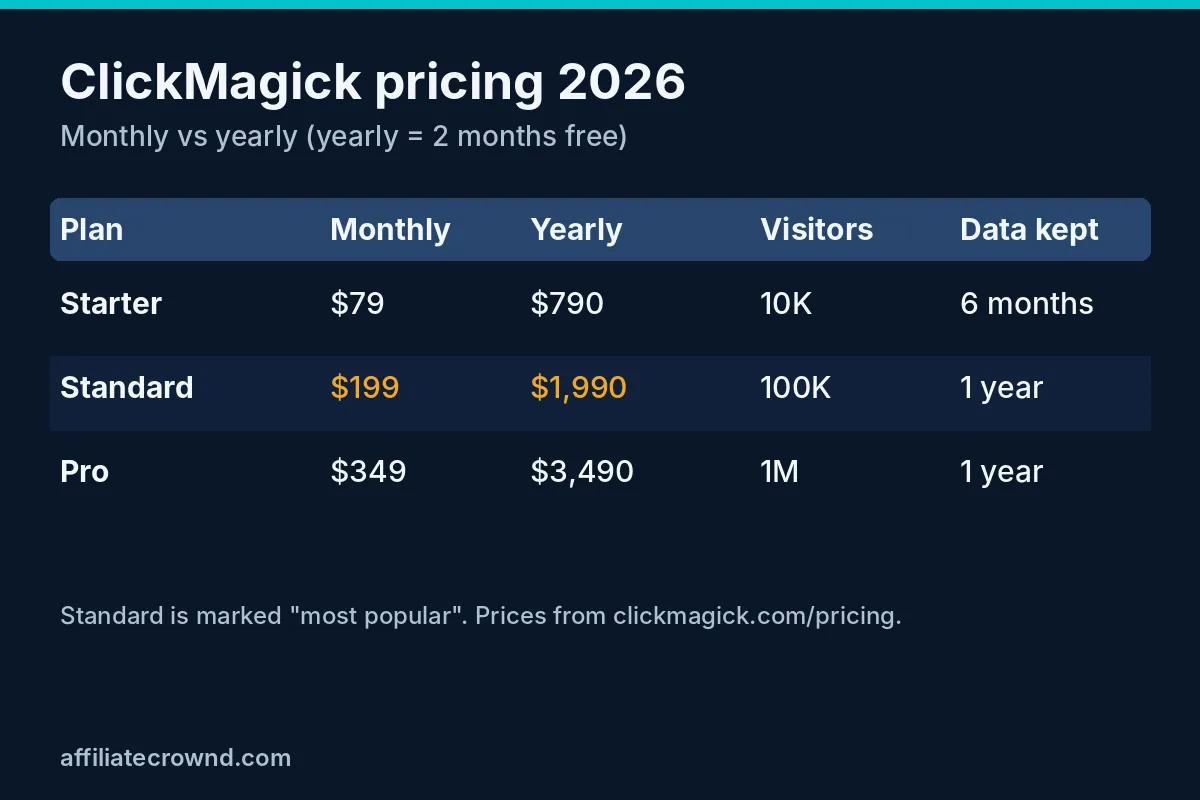
| Plan | Monthly | Yearly | Tracked visitors |
|---|---|---|---|
| Starter | $79/month | $790/year | 10,000 |
| Standard | $199/month | $1,990/year | 100,000 |
| Pro | $349/month | $3,490/year | 1,000,000 |
On the yearly toggle, those plans work out to about $66, $166 and $291 a month, billed as $790, $1,990 and $3,490 up front. Extra websites on Standard and Pro cost $40 a month each, or $400 a year.
What each plan includes
| Feature | Starter | Standard | Pro |
|---|---|---|---|
| Tracked visitors | 10,000 | 100,000 | 1,000,000 |
| Users | 1 | 1 + 2 team members | Unlimited team members |
| Websites or stores | 1 | 1 (more at +$40/month each) | 1 (more at +$40/month each) |
| Affiliate projects | Unlimited | Unlimited | Unlimited |
| Ad accounts per platform | 1 | 5 | Unlimited |
| AI Insights | 10 active ads | 25 active ads | 50 active ads |
| Data retention | 6 months | 1 year | Not listed (Pro includes everything in Standard) |
| Support | Basic online support | Fanatical Support + one-on-one onboarding call | Same as Standard |
| Audience Optimization (CAPI) | Yes | Yes | Yes |
| Basic bot filtering | Yes | Yes | Yes |
| Click Shield bot and click-fraud protection | No | Yes | Yes |
| Advanced attribution models | No | Yes | Yes |
| Phone and offline sales tracking | No | Yes | Yes |
Every plan also includes a first-party tracking domain, automatic ad cost updates, real-time stats, the mobile app, API, MCP and Zapier access, the Setup Wizard and the daily Morning Magick™ email. Pro includes everything in Standard.
Which ClickMagick plan should you choose?
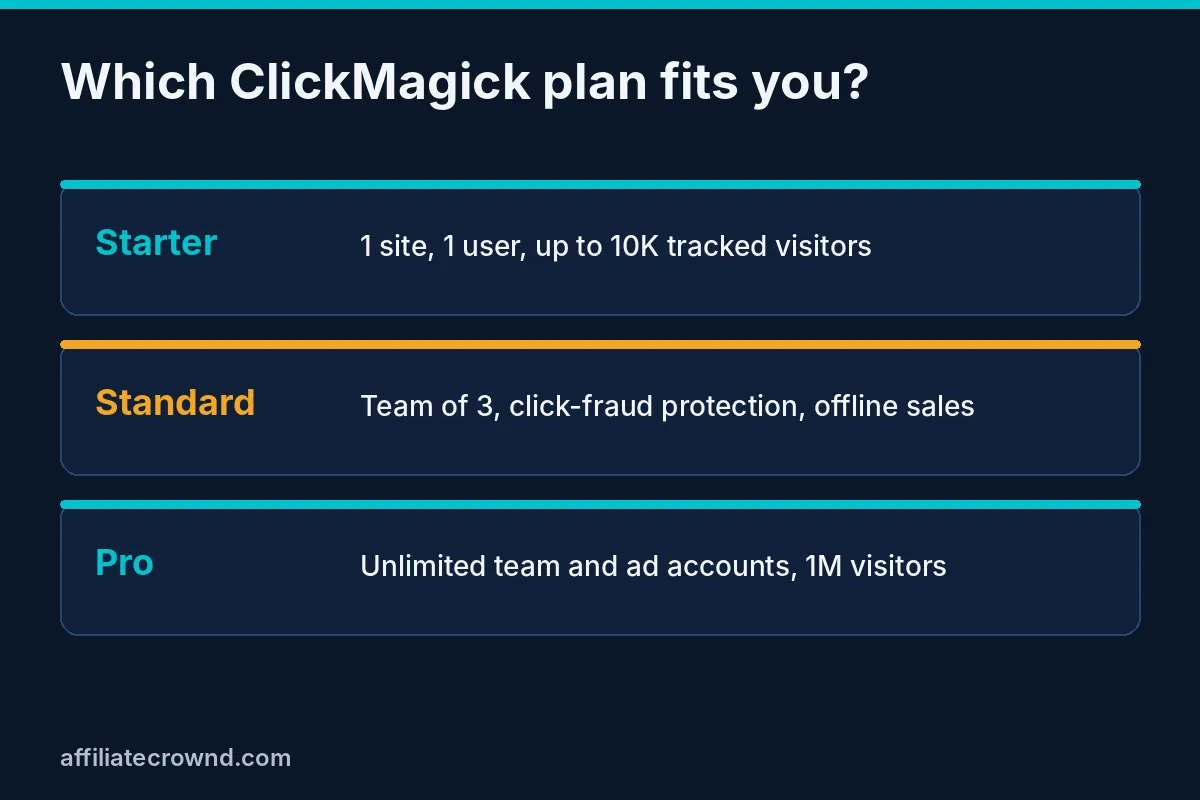
- Choose Starter ($79/month) if you work alone, have one website or store, and send fewer than 10,000 visitors a month. A nice detail for affiliates: Starter allows unlimited affiliate projects, so you can track many different offers on one plan.
- Choose Standard ($199/month) if you spend real money on ads and want Click Shield to filter bots and fake clicks, multi-touch attribution, phone sales tracking, more ad accounts and a one-on-one onboarding call.
- Choose Pro ($349/month) if you run an agency or a team, manage many ad accounts or track hundreds of thousands of visitors a month.
Pricing checked November 27, 2026
Start on the plan that matches your traffic now. You can move up once you see real numbers, and the 14-day trial lets you check the setup before you pay.
What ClickMagick Really Costs: A Worked Example
Prices only mean something next to what you spend on traffic. Here is a simple example using the list prices above. The traffic and ad-spend figures are made up for illustration, not results.
| Your situation | Plan | Yearly cost | Tracker cost vs ad spend |
|---|---|---|---|
| Affiliate spending $500/month on TikTok ads, about 4,000 visitors | Starter | $790 (yearly) or $948 (monthly) | About 13–16% of spend (above our 10% line, so borderline) |
| Affiliate spending $2,500/month across Meta and Google, about 15,000 visitors | Standard (over the 10,000 Starter limit) | $1,990 or $2,388 | About 7–8% of spend |
| Small agency spending $15,000/month for clients, about 150,000 visitors | Pro | $3,490 or $4,188 | About 2% of spend |
Our rule of thumb (an AffiliateCrownd guideline, not a ClickMagick figure): if the tracker would cost more than about 10% of your monthly ad spend, it is usually too early. If it costs under 5% and you are unsure which ads make money, a tracker can pay for itself if it helps you turn off even one losing ad.
Per visitor, Starter costs under 1 cent when you use all 10,000 visitors ($79 ÷ 10,000). At 2,000 visitors a month, it is about 4 cents each. Low traffic makes every tracked click expensive.
Hidden Catches to Know Before You Pay
- The trial is for first-timers. ClickMagick’s Trial Policy offers a free trial to anyone who hasn’t had an account in the past 6 months. Returning users can sign up again but are asked to pay or cancel.
- Refunds are narrow. Only charges from the past 30 days, and only your first account. A second account gets no refunds.
- Starter is one website and one ad account per platform, with 6 months of data. The pricing page lists no extra-website add-on for Starter; on Standard and Pro they cost $40 a month each.
- Click Shield, advanced attribution and phone sales tracking start at Standard ($199 a month).
- Visitor limits. The pricing page lists the tracked-visitor cap for each plan but doesn’t explain what happens if you go over. Ask ClickMagick before a big campaign.
- Affiliate tracking depends on your network, as explained above. CJ Affiliate needs manual approval for postbacks.
- Billing complaints exist. Some 1-star Trustpilot reviews mention charges after cancelling. ClickMagick disputes many of those reviews. Either way, cancel inside your account before the renewal date and keep the confirmation email.
ClickMagick Free Trial and 30-Day Money-Back Guarantee
The pricing page lists a 14-day free trial. When we checked the signup page on November 27, 2026, it asked only for your full name, email address and a password, with no payment fields, and said “Don’t pay today.” Neither the signup page nor the Trial Policy says exactly when billing starts, so read the screens inside your account during the trial and assume you will need to choose a paid plan to keep tracking after day 14.
ClickMagick’s Trial Policy (last updated July 24, 2025) adds one rule: the free trial is for anyone who hasn’t had an account in the past 6 months.
After you pay, the Refund Policy (updated March 28, 2026) offers a no-questions-asked 30-day money-back guarantee for new customers, including people who forgot to cancel a trial. Three details matter:
- Refunds only cover charges made in the past 30 days.
- Only your first account qualifies. A second or later account is not covered.
- The policy doesn’t list cancellation steps; it just says to “let us know” to request a refund. The signup page says you can upgrade, downgrade or cancel “any time with 2 clicks”, which is ClickMagick’s own claim.
To get the most from your 14 days, add your tracking code on day one, connect one traffic source and one conversion, and let real visitors flow through. Set a reminder for day 12 so you can decide calmly. You can read the full refund policy and trial policy on ClickMagick’s site.
Trial tip
Track one campaign that already gets traffic, such as one ad, video or email. A small, real test teaches more than a big setup with no visitors.
ClickMagick Features: What You Actually Get
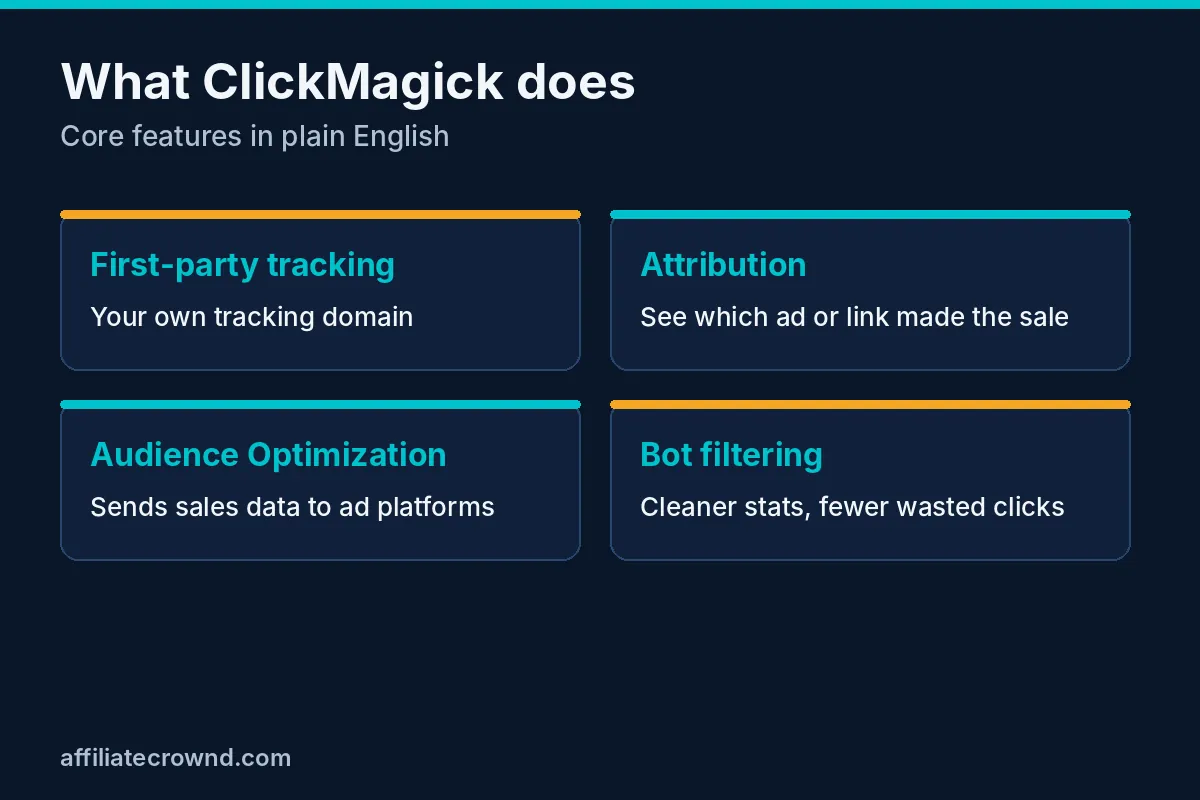
Here are the features that matter most for affiliates and creators, in plain terms.
First-party tracking and a hard-to-block script
Every plan includes a first-party tracking domain, which means the tracking runs from your own domain rather than someone else’s. ClickMagick also offers a custom tracking domain and what it calls a random script loader, which it says makes the tracking code hard for blockers to stop. That is the company’s claim, so treat it as something to check in your own reports.
Cross-device tracking
People often see an ad on their phone and buy later on a laptop. Cross-device tracking connects those visits to the same person, so the sale is credited to the ad that started it.
Attribution models (Standard and up)
An attribution model is the rule for sharing credit. “First click” credits the first touch, “last click” the final one, and multi-touch models share credit across several steps. Standard and Pro include these advanced models, which help when buyers see you several times before buying.
Audience Optimization™ and the Conversions API
This is a big reason people pay for a tracker. The Conversions API, often shortened to CAPI, is a way to send conversion data straight from a server to an ad platform like Meta, instead of relying only on a browser pixel. Audience Optimization™ sends your first-party conversion data back to the ad platforms so they have better information to work with. It can optimize for any conversion type, including opt-ins and add-to-carts, not only sales. It is on every plan, though it needs extra setup.
Click Shield™ and bot filtering
All plans include basic bot filtering. Standard and Pro add Click Shield™, which is built to spot bots and click fraud, meaning fake or junk clicks that use up your budget. If you pay per click, weigh this before picking a plan.
Phone and offline sales tracking (Standard and up)
If some sales happen on a phone call or in person, Standard and Pro let you connect them back to the click that brought the customer in. That suits coaches, consultants and service businesses.
Reports, split tests and the URL builder
You get real-time stats and reports, A/B split testing (sending visitors to two pages to see which one performs better) and a URL builder that helps you create tagged links without typing UTM codes by hand. There is a mobile app too, handy if, like Oscar, you check most things on your phone.
Insights, Morning Magick™ and AI Insights
ClickMagick Insights and the Morning Magick™ daily email, on all plans, are designed to tell you what to scale, fix or pause. Every plan also includes API, MCP and Zapier access. AI Insights covers a set number of active ads per plan: 10 on Starter, 25 on Standard and 50 on Pro. Treat these as prompts; you still make the final call.
How Affiliates Use ClickMagick
Here are four everyday ways affiliates and creators use it. None of them needs advanced skills, just a little patience.
1. Tracking affiliate links
Instead of pasting a raw affiliate link everywhere, create a tracking link for each offer and each place you share it. You then see how many clicks each placement gets and, once conversions flow back, which ones lead to commissions. Starter allows unlimited affiliate projects, which suits people who promote many programs. Looking for programs to track? Browse our top programs page.
2. Tagging every source with UTMs
Add UTM parameters to the links in your ads, videos, posts and emails, so each click carries a label like “youtube” or “newsletter”. The URL builder makes this quick, and after a few weeks you can compare sources side by side.
3. Split testing your pages
If you send traffic to a bridge page or review page before the offer, try two versions with a split test. Change one thing at a time, such as the headline or the button text, and keep the version that earns more clicks to the offer. If you build pages on WordPress, our guide on how to build an affiliate website on WordPress covers the basics.
4. Measuring email and social clicks
Organic channels need tracking too. Tag your newsletter and social links to see which emails and posts send buyers, not just clicks.
A simple rule: track one thing well before you track everything. A clean report on three sources beats a messy one on twenty.
Ready to see which clicks pay?
Set up one tracking link for your best offer and watch it for a week during your trial.
What Users Say About ClickMagick (and Is It Legit?)
ClickMagick is a real, long-running company: ClickMagick, Inc. has sold its tracker since 2014. Here is what its biggest public review profile shows, checked November 27, 2026.
- Trustpilot: TrustScore 4.1 out of 5 from 679 reviews, 40 of them in the past 12 months. 90% are 5-star and 6% are 1-star.
- Common praise: helpful support, simple campaign setup, useful data for improving ads, and smooth refunds.
- Common complaints: unexpected charges, including after cancelling; slow or incomplete support for some people; a dashboard some find clunky; and doubts about data accuracy.
- ClickMagick’s side: Trustpilot shows that it replies to every negative review. Many replies say the 1-star reviews are fake, and the company says it no longer actively maintains the profile.
Trustpilot says it doesn’t fact-check reviews, so treat the score as one signal. The pattern is useful anyway: most people praise support and results, and the complaints are mostly about billing. That is why the trial reminder and cancellation advice above matter.
ClickMagick Alternatives With Checked Prices
You have other options, and some are free. Prices below come from each company’s own pricing page on November 27, 2026 (Pretty Links on November 24, 2026). Plans are measured differently, by visitors, events or sessions, so compare what you would actually track.
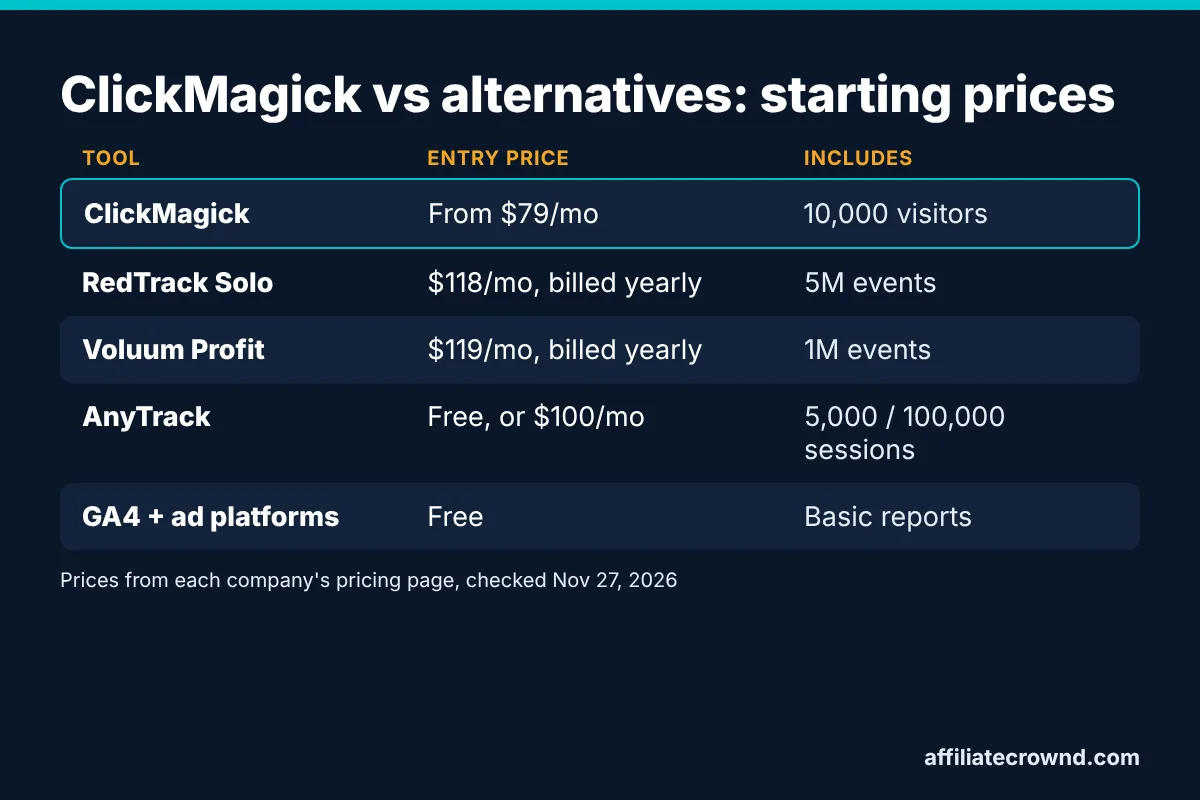
| Tool | Starting price | Best for | Link |
|---|---|---|---|
| ClickMagick | $79/month (10,000 visitors), or $790/year | Affiliates and creators who want ad tracking plus affiliate postbacks in one place | See ClickMagick |
| RedTrack | Solo: $118/month billed yearly ($1,420/year), 5M events | Affiliates and lead-gen teams with high event volumes | RedTrack pricing |
| Voluum | Profit: $119/month billed yearly, 1M events | Media buyers who want a classic affiliate tracker | Voluum pricing |
| AnyTrack | Free (5,000 sessions) or Starter $100/month (100,000 sessions) | Trying conversion tracking for free first | AnyTrack pricing |
| Hyros | No price we could confirm (Nov 27, 2026); ask for a quote | Larger advertisers; check its site | Hyros |
| GA4 + ad platform reports | Free | Beginners and single small campaigns | Google Analytics |
| Pretty Links | Beginner: $99.60 first year, then $249/year | Short, branded affiliate links on WordPress (not ad attribution) | See Pretty Links |
ClickMagick vs free ad platform tracking and GA4
The tracking built into Meta, Google and TikTok is free, and so is Google Analytics 4. For a beginner, that is a fine start. The trade-off is that each tool sees things from its own angle, and none of them receives affiliate network postbacks. ClickMagick brings first-party tracking, cross-device tracking, the Conversions API and affiliate postbacks together, but you pay for that every month.
ClickMagick vs Hyros
Hyros is a paid attribution tool aimed at bigger advertisers. We couldn’t load its pricing page when we checked, so we can’t compare costs fairly here. If you are choosing between the two, ask both for a quote at your traffic level and check which one supports your affiliate network’s postbacks. ClickMagick also publishes its own ClickMagick vs Hyros comparison; it is written by ClickMagick, so read it as the company’s side.
ClickMagick vs RedTrack and Voluum
RedTrack and Voluum are trackers built around media buying and affiliate campaigns. Their entry plans cost more than ClickMagick Starter ($118–$119 a month billed yearly, versus $66–$79), and they are measured in events rather than visitors. They suit people running high volumes of paid traffic. ClickMagick’s Starter plan is the cheaper way in if you track up to 10,000 visitors a month.
ClickMagick vs Pretty Links
These tools do different jobs. Pretty Links is a WordPress plugin for short, branded links and redirects. It is not an ad attribution tool. Oscar uses Pretty Links on AffiliateCrownd for exactly that purpose. Many bloggers only need a link manager, and add a tracker once they start paying for traffic.
ClickMagick Review: Pros and Cons
Pros
- Tracks clicks and conversions from ads, social posts, emails and on-site actions in one dashboard.
- First-party tracking domain and Audience Optimization (CAPI) are included on every plan, even Starter.
- Unlimited affiliate projects on Starter, which suits affiliates who promote many offers.
- Pricing isn’t tied to your contact count or ad spend, according to ClickMagick.
- 14-day free trial with no payment fields on the signup form, plus a 30-day money-back guarantee for new customers.
- Works with affiliate networks through Postback URLs and Sub-IDs, with built-in tools to create them.
Cons
- Starter at $79 a month is a real cost for beginners with little traffic.
- Click Shield, advanced attribution and phone sales tracking need Standard at $199 a month.
- Starter keeps data for 6 months and allows 1 website and 1 ad account per platform.
- Setup takes some comfort with tracking codes, and Audience Optimization and Click Shield need extra work.
- The trial is 14 days, which is short if your traffic is slow.
- Affiliate sale tracking only works if your network supports postbacks or Sub-IDs.
- Some Trustpilot reviewers report billing problems after cancelling.
How to Set Up ClickMagick in 7 Steps
If you’ve added a tracking code before, basic setup is quick. If not, give yourself extra time and lean on the Setup Wizard and tutorials. Follow these 7 steps in order.
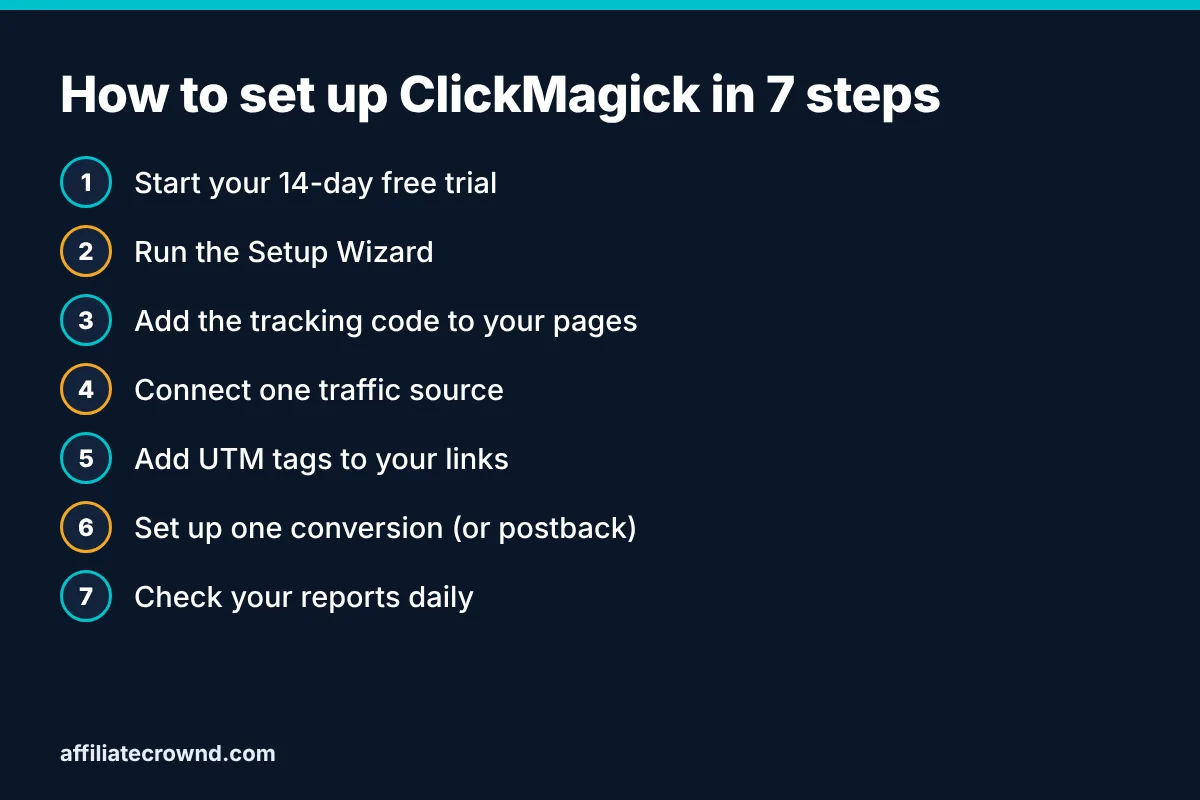
- Start your trial. Sign up through the ClickMagick free trial link and pick the plan that matches your current traffic.
- Run the Setup Wizard. Follow the step-by-step prompts and connect your website or store.
- Add the TrueTracking code to your pages. On WordPress this usually means pasting it into your header settings or a code plugin.
- Connect one traffic source. Link one ad account or set up tracking links for one channel you already use.
- Add UTM parameters to your links. Use the URL builder so every click carries a clear label.
- Set up one conversion. A sale, sign-up or add-to-cart. For an affiliate offer, add your network’s Postback URL (see how affiliate tracking works). Leave Audience Optimization and Click Shield until the basics work, since they need more setup.
- Check your reports daily. Read the Morning Magick™ email and compare sources after a week. Ready? Open ClickMagick.
If you get stuck, use the tutorials first. Standard and Pro customers also get Fanatical Support and an onboarding call.
What to Do After You Sign Up: Your First 14 Days
- Day 1: install the tracking code, create one tracking link and click it yourself once to see it appear. Then exclude your own visits so your tests don’t mix with real visitors.
- Days 2–3: connect one ad account or one channel, and add your network’s Postback URL for one offer.
- Days 4–10: let real traffic run. Read the Morning Magick™ email and note which source sends clicks that turn into sales.
- Day 11: compare ClickMagick’s numbers with your network’s report and your ad platform. Small gaps are normal; big ones mean a setup step is missing.
- Day 12: decide. Keep the plan that fits your traffic, change plans, or cancel and keep the confirmation email.
Already Know ClickMagick? How to Buy the Right Plan
Ready to buy? Here is the short version: pick your plan, choose how you pay, then start with the 14-day free trial.
Pick your plan in 10 seconds
- Fewer than 10,000 visitors, one site, working alone: Starter ($79/month).
- Paying for clicks and worried about bots, or have a small team: Standard ($199/month).
- Agency, many ad accounts or hundreds of thousands of visitors: Pro ($349/month).
- More than 1,000,000 visitors a month? The pricing page flags this but lists no price, so contact ClickMagick.
Monthly vs yearly
Yearly billing works out to 2 months free. Paying yearly saves you $158 on Starter ($948 if you pay monthly for 12 months versus $790), $398 on Standard ($2,388 versus $1,990) and $698 on Pro ($4,188 versus $3,490). That is our own math from the list prices, so confirm the final amount at checkout.
Monthly is the lower-risk choice while you are still testing. Yearly makes sense once you know you will keep using it.
Current deals
As of November 27, 2026, ClickMagick lists no Black Friday sale or coupons; the yearly plan (2 months free) is the built-in discount.
How to buy in 3 steps
- Open ClickMagick’s pricing page through our link.
- Choose Monthly or Yearly and click the plan you want.
- Start the 14-day free trial, then set a reminder for day 12.
Switching from GA4 or another tracker
Keep Google Analytics 4 and any current tracker running while you set up ClickMagick. Compare the numbers side by side for a few weeks, and switch off the old setup only once ClickMagick is tracking your traffic and conversions the way you expect. If you are leaving another paid tracker, check its billing date first so you are not charged for an extra month.
Picked your plan? Start free and decide before day 14.
ClickMagick Affiliate Program
If you like the tool and your audience runs ads or tracks campaigns, the ClickMagick affiliate program lets you recommend it. Here is what its referral program page says:
- Commission: 35% recurring.
- Payouts: daily through PayPal MassPay, so you need a PayPal account.
- Minimum payout: $50.
- Refund lag: commissions wait 14 days to allow for refunds.
- Cookie length: not stated on the page.
- Rules: no self-referrals; no extra referral accounts without approval; no promotion on pay-per-click platforms such as Google Ads or on coupon sites (“There are no coupons”); no “ClickMagick” in domain names; no ClickMagick videos, images or logo without written consent; and no spam.
Recurring means you are paid again when a customer renews, but earnings depend entirely on your audience and effort. To apply, visit the ClickMagick referral program page. Building a list of programs to promote? See our guide to the best affiliate programs for beginners and our top programs page.
ClickMagick Sign Up, Login and Support Pages
- Sign up / free trial: Start your ClickMagick free trial
- Log in: ClickMagick login page
- Pricing: ClickMagick pricing page
- Help articles: tracking affiliate sales with Postback URLs
- Contact support: Get In Touch page
- Policies: Trial Policy and Refund Policy
Before You Buy: ClickMagick Checklist
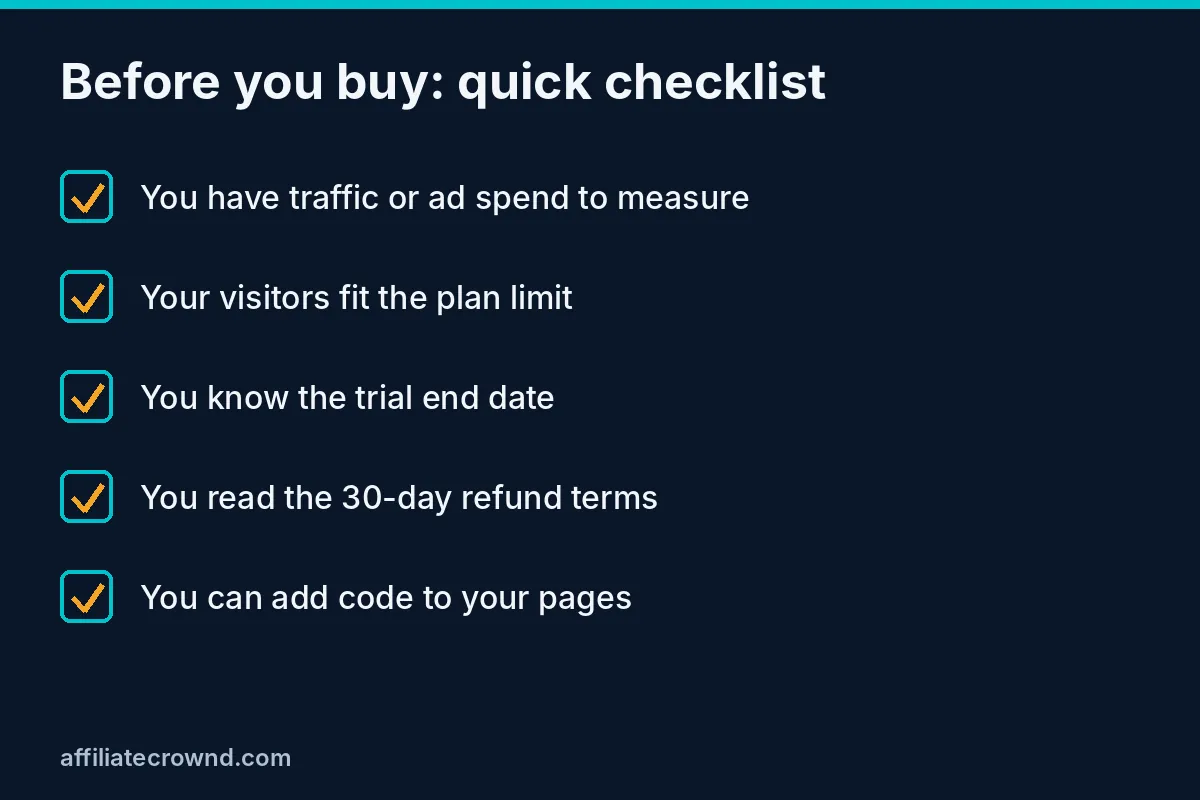
- I can name at least one traffic source I want to measure, and I am getting real visitors from it.
- My affiliate network supports Postback URLs or Sub-IDs.
- I know roughly how many visitors I get each month, so I can pick between 10,000, 100,000 or 1,000,000.
- I know whether I need Click Shield, advanced attribution or phone sales tracking (Standard and up).
- I can add a tracking code to my site, or I am ready to follow the Setup Wizard and tutorials.
- I have a plan for the 14-day trial and a reminder set before it ends.
- I understand the refund rules: new customers, first account only, charges from the past 30 days.
ClickMagick Review FAQ
How much does ClickMagick cost in 2026?
ClickMagick has three plans. Starter costs $79 a month or $790 a year for 10,000 tracked visitors. Standard costs $199 a month or $1,990 a year for 100,000 tracked visitors. Pro costs $349 a month or $3,490 a year for 1,000,000 tracked visitors. Yearly billing includes 2 months free. Prices were checked on November 27, 2026.
Is ClickMagick free, and does the trial need a credit card?
ClickMagick is not free, but it has a 14-day free trial. When we checked on November 27, 2026, the signup form asked only for a name, email and password, with no payment fields. The trial is for people who haven’t had a ClickMagick account in the past 6 months.
Does ClickMagick offer refunds?
Yes. New customers get a no-questions-asked 30-day money-back guarantee, including if they forgot to cancel a trial. Refunds only cover charges from the past 30 days, and only your first account qualifies.
Is ClickMagick legit or a scam?
ClickMagick is a real tracking company, ClickMagick, Inc., selling its tool since 2014. On November 27, 2026 its Trustpilot TrustScore was 4.1 out of 5 from 679 reviews. Most praise its support; the most common complaints are about billing, so cancel inside your account before renewal.
Can ClickMagick track sales from affiliate networks like ClickBank?
Yes, if the network supports Postback URLs or Sub-IDs. You add a ClickMagick click ID to your affiliate link and give the network your ClickMagick Postback URL. ClickMagick has guides for networks such as ClickBank and MaxBounty; CJ Affiliate must approve postbacks first.
ClickMagick Review Verdict: Is It Worth It in 2026?
If you pay for traffic or promote offers across many channels, ClickMagick is worth a serious look. It brings click tracking, first-party and cross-device attribution, the Conversions API and affiliate postbacks together, and even Starter includes Audience Optimization and unlimited affiliate projects. Standard is the better fit once fake clicks and multi-step buyer journeys start costing you money.
If you are just starting out, there is no rush. Free tools will teach you a lot, and ClickMagick will still be there when you have traffic worth measuring. Want the big picture first? Read our guide to what affiliate marketing is.
Oscar’s pick: what we’d do in your shoes
If you are spending at least a few hundred dollars a month on ads, start the Starter trial, confirm your network’s postback works on day 2, and only move to Standard if bots or multi-step journeys show up in your data. If you aren’t paying for traffic yet, keep your money and use GA4 for now.
Free Starter Toolkit
Not ready to buy a tracker? Get the free AffiliateCrownd Affiliate Starter Checklist: a 7-day beginner plan, checklist and worksheets by email for setting up your site, your email list and your first affiliate links.
Last checked: November 27, 2026. Prices and terms change, so confirm on ClickMagick’s website before you buy.
Sources
- ClickMagick pricing, signup page, Trial Policy and Refund Policy (checked Nov 27, 2026)
- ClickMagick referral program (checked Nov 27, 2026)
- ClickMagick Knowledge Base: Postback URLs and Sub-ID tracking (checked Nov 27, 2026)
- ClickMagick on Trustpilot (checked Nov 27, 2026)
- RedTrack, Voluum and AnyTrack pricing pages (checked Nov 27, 2026)